APIAuthenticate requests to the prefix GraphQL or REST endpoints with API keys
prefix.dev uses API Keys to authenticate requests from command line tools or scripts. Both, REST endpoints and GraphQL queries can be authenticated using an API Key.
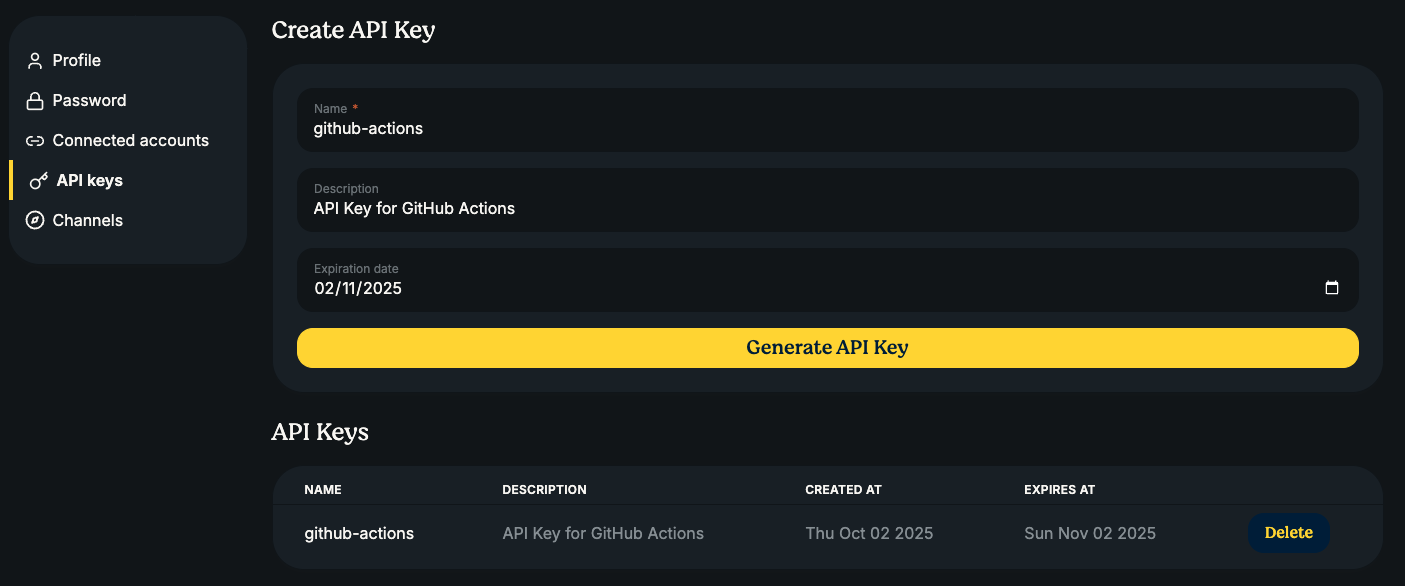
You can generate an API Key via the user interface (User Icon → Settings → API Keys) or via a GraphQL mutation. We treat API Keys like passwords and never store them in plaintext. That means, after you receive the API Key you are responsible for storing and keeping it safe, as we do not have a copy of it. We only store a cryptographically secure hash on our servers.
Authenticating with the API Key
To authenticate with an API Key, we use the common: Authorization header with a
Bearer token. For example, an authenticated request using curl would look
like:
curl https://prefix.dev/api/graphql \
     -H "Authorization: Bearer pfx_vr2XPfxpByKvGVhzrINSERTYOURTOKENHERE" \
     --data '{"query": "{ viewer { login }}"}'
And similarly, using Python requests:
import requests

query = "{viewer { login }}"
token = "pfx_vr2XPfxpByKvGVhzrINSERTYOURTOKENHERE"

headers = {"Authorization": f"Bearer {token}"}

response = requests.post("https://prefix.dev/api/graphql", json={"query": query}, headers=headers)

print(response.json())
REST endpoints
The prefix.dev platform has several REST endpoints:
POST /api/v1/upload/:channel?force=true|false
Upload a package to the given channel (useforce=trueto overwrite existing packages)DELETE /api/v1/delete/:channel/:subdir/:package_file_name
Delete a package from the channelPOST /api/v1/reindex/:channel/:subdir
Trigger a reindexing of a given channel / subdir (this happens automatically when deleting or uploading a new package and should not be necessary to trigger manually)
Uploading a package via API
To upload a package to a prefix.dev channel you will have to provide a couple
extra headers (besides the Authorization):
X-File-Name: The filename of the package, including the extension (.condaor.tar.bz2)X-File-SHA256: The SHA256 hash of the data that you are sending / the package. We use this information to verify the data we received is the exact same data that you have sent. You can later verify that the hash in the generated repodata also matches.Content-Length: A standard header to indicate the size of the package that you are uploadingContent-Type: Set this toapplication/octet-stream
Query parameters
force(optional): Set totrueto overwrite an existing package with the same name, version, and build string. Defaults tofalse, which will reject uploads if the package already exists.
An example of uploading a package from Python follows:
import sys
from pathlib import Path
import hashlib

import requests

channel = "https://prefix.dev/api/v1/upload/test-channel"
token = "pfx_INSERTYOURTOKENHERE"

def upload(fn, force=False):
    data = fn.read_bytes()

    # skip if larger than 100Mb
    if len(data) > 100 * 1024 * 1024:
        print("Skipping", fn, "because it is too large")
        return

    name = fn.name
    sha256 = hashlib.sha256(data).hexdigest()
    headers = {
        "X-File-Name": name,
        "X-File-SHA256": sha256,
        "Authorization": f"Bearer {token}",
        "Content-Length": str(len(data) + 1),
        "Content-Type": "application/octet-stream",
    }

    url = f"{channel}?force={'true' if force else 'false'}"
    r = requests.post(url, data=data, headers=headers)
    print(f"Uploaded package {name} with status {r.status_code}")


if __name__ == "__main__":
    if len(sys.argv) > 1:
        upload(Path(sys.argv[1]))
    else:
        print("Usage: upload.py <package>")
        sys.exit(1)
When you upload a package, the prefix.dev server will perform some basic
integrity tests. First, we compare the SHA256 and content length of the received
data. Then we can extract an index.json file from the package, and that the
name, version and build string match the filename provided (the pattern is
<name>-<version>-<build>.<ext>).
After the package is uploaded, an asynchronous reindexing job is started which indexes the channel. This usually completes within a few seconds.